

|
|
|
|
| Author |
|
|
Registered
|
Day 57: Surround Sound Installation!
Here's the scenario:
Sony HT-1700D Receiver / Surround Sound Sony DVP-NS315 CD/DVD Player Samsung DLP TV Motorola Digital Cable Box Of course, this means 4 remote controls to deal with!!! I've been screwing around with this setup off & on for almost 2 months. What a PITA! Everything works EXCEPT I can't get a picture when a DVD is being played - audio only (yes, everything is set to work on Channel 3). All 4 owner's manuals show different ways to connect the miles of cables between the components, even the 2 Sony manuals and those components were sold as a set!!!  Any experts out there who can walk me thru a logical approach to connecting everything properly????? My LeMans DVD awaits you ..... -- Curt |
||
 07-21-2003, 07:07 PM
|
|
|
one of gods prototypes

|
did you use s-video for the dvd? if you did you may need to switch the input on the tv.......
also if your remote has IR learning capability you can program all the other remotes to it and have 1 full function remote. if not you should look into the marantz rc-500.......touch screen, custom icons you can download, macro capability etc. and i can walk you through.....do you have a digital camera? it may make things easier
__________________
Brought to you by Carl's Jr. Last edited by bell; 07-21-2003 at 07:21 PM.. |
||
|
07-21-2003, 07:19 PM
|
|
|
Registered
|
Bell, S-video is about the only thing I haven't tried. I'll take photos of the back of each component. I just want to get the thing working right now, later I can do some remote control 'management'. Thanks! -- Curt
|
||
|
07-21-2003, 07:56 PM
|
|
|
one of gods prototypes
|
ok i'll be online for a while tonite.........
menus can be a bit@h sometimes...... if you are using s-video from the dvd to the reciever then you need to have an s-video from the reciever to the tv, then you must switch the input on the tv to the apropriate input which the dvd plugs into........ let's see some pics.....we'll get you strait
__________________
Brought to you by Carl's Jr. |
||
|
07-21-2003, 08:03 PM
|
|
|
one of gods prototypes
|
i'm at crutchfields site looking at the rear of the unit so i'll have a quick answer for you

__________________
Brought to you by Carl's Jr. |
||
|
07-21-2003, 08:20 PM
|
|
|
Registered
|
OK, here's some photos:
Receiver: 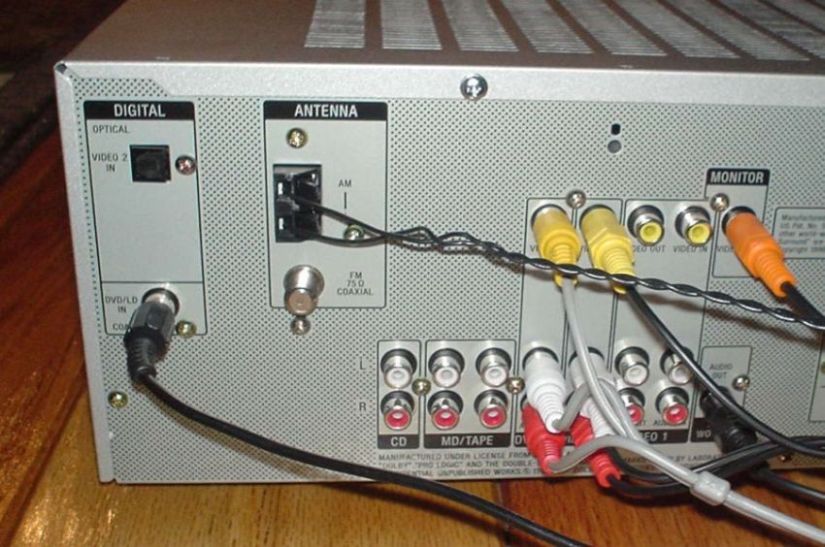 DVD on Top - Cable Box on Bottom:  Back of TV: 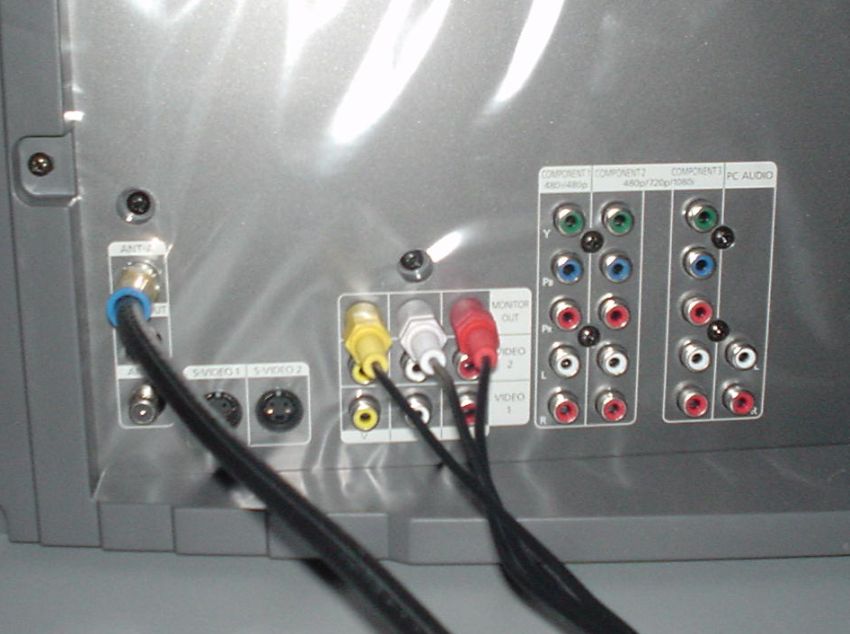 Hopefully, these are readable in their reduced form. I'm going offline, but will check back tomorrow and see what you think. Thanks! -- Curt |
||
|
07-21-2003, 09:07 PM
|
|

|
|
one of gods prototypes
|
ok here you go.......this will let you watch dvd.but there is a way to get a MUCH better pic from your dvd......
that tv has component video inputs (R/G/B), if you run the dvd component video output to the tv's component inputs you'll notice a VERY nice improvement in picture quality.....but let's get you enjoying this first, we'll cover that later follow these 2 pics..........switch your tv input from it's remote to input 1, then you'll see dvd. but you'll need to use the remote again to go back to watch tv. OR you cound run rcas from your cable box to the new reciever to the video 1 inputs on the reciever, then you leave the tv input on "input 1" and switch sources (tv/dvd) on the reciever to switch between the two.  
__________________
Brought to you by Carl's Jr. |
||
|
07-21-2003, 09:26 PM
|
|
|
one of gods prototypes
|
oh i forgot to add.......if you don't run rca's from your cable box rca out to the reciever inputs then you won't hear your cable through the new speakers.....you can leave the coaxial cables hooked up like they are for the wifey so she can watch tv without having to turn on the reciever.
__________________
Brought to you by Carl's Jr. |
||
|
07-21-2003, 09:36 PM
|
|
|
one of gods prototypes
|
now....... if you want "the setup" here's what you do.....
every component should run through the reciever (dvd/vcr/cable box/etc) keeping it simple you can use rca's throughout. the vcr's rca out TO video input 2 on reciever (to feed reciever with vcr signal) the vcr input TO video 1 output on reciever (to feed tv signal to the vcr for recording) the dvd rca output TO dvd input on reciever (to feed reciever dvd signal) the cable box rca output TO video input 1 on reciever (this will feed cable box to reciever) then run monitor video out on from reciever TO video input 1 on the back of the tv. AND for a better picture...............use either an s-video or rca's designed for component video use TO the component input on the back of the tv, this will give you a MUCH better picture than using the rca input (you can leave both hooked up, just select with the remote which one to use) you may need to go into the tv menu using the tv remote to assign the inputs but the tv manual should walk you through this (i'm not sure how your tv functions) this will let you switch all your sources through the reciever (which is what it's designed to do) once you get used to this setup you'll understand how this actually works/looks let me know if you understand what i typed, i'll check tomorrow morning around 9am then i'm off to work.
__________________
Brought to you by Carl's Jr. Last edited by bell; 07-21-2003 at 09:55 PM.. |
||
|
07-21-2003, 09:53 PM
|
|
|
Registered

|
what he said...your main problem was the signal out of the dvd was going to an *output* on the TV rather than an input.
Component should be better than S-video, but again bell is right that either will be superior to the composite (single yellow) signal. |
||
|
07-21-2003, 10:25 PM
|
|
|
Registered
|
Excellent! Looks like I've got a project after work tonight ..... -- Curt
|
||
|
07-22-2003, 04:41 AM
|
|
|
Registered
|
Anybody want to buy a $6000 Home Theater system? Cheap! I'll throw in all 4 remote controls with the deal! Just spent another hour, plus the time to go buy $120 worth the new cables and nothing. Hooked it up like above - no change. Then tried feeding everything thru the receiver, still no picture with the DVD!!!!!! And now the TV audio only works thru the TV, not the surround sound. Even tried running the DVD direct to the TV and nothing. It's got to have something to do with the cable box. BTW, there's no cable (coaxial) connection on the receiver. Shouldn't the cable go to the receiver if it's supposed to control everyhting???
Probably need a few days of rest before I tackle it once again ........ I think I'll go out and rebuild my Webers now - that's got to be child's play compared to this .....
|
||
|
07-22-2003, 05:48 PM
|
|
|
one of gods prototypes
|
ok............settle down..........
you didn't GET everything i posted.........  on your tv there are at least 3 different inputs.........right now you tv is set to the tuner input.......you need to use the remote control for the tv and switch the input to "input 1"........ the extra inputs do not work on channel 3, the proper input needs selected on the remote control.
__________________
Brought to you by Carl's Jr. |
||
|
07-22-2003, 05:57 PM
|
|
|
one of gods prototypes
|
also the coaxle cable for the cable box can stay hooked up, using the rcas off the back of the cable box will give you the ability to wire it through your reciever.
i'm telling you if you made the connections like the pics then all you have to do is get it off channel 3 and on input 1.
__________________
Brought to you by Carl's Jr. |
||
|
07-22-2003, 06:00 PM
|
|
|
Registered
|
OK, let me finish off this 5th of Jack and I'll go play with that for a while .......
 -- Curt -- Curt
|
||
|
07-22-2003, 06:00 PM
|
|
|
one of gods prototypes
|
and if you can't figure it out...........when i get my carrera back we'll hold a home theater tech session, i'll "educate" whoever wants to come
i need to take a road trip anyway.......i should be ready to roll in 2 weeks max i hope.what part of michigan are you in? hopefully not northern only other thing i can think of is sometimes new tv's have to have the inputs assigned..........i'll check online for a manual on yours to see if maybe that's the case.
__________________
Brought to you by Carl's Jr. |
||
|
07-22-2003, 06:04 PM
|
|
|
Registered
|
Houston? The Eagle has landed!
Thanks Bell, I owe you one ..... -- CurtI'm 90 miles north of Detroit. |
||
|
07-22-2003, 06:05 PM
|
|
|
one of gods prototypes
|
use the tv remote and see if by going into the menu you can goto this screen.
 this screen tells you what is connected, i believe you'll need everything powered up for this...still looking for a manual
__________________
Brought to you by Carl's Jr. |
||
|
07-22-2003, 06:09 PM
|
|
|
one of gods prototypes
|
wow i missed your post last night
so it's working i take it, you're not too far for a road trip......i can do a 4 hour drive in my sleep.......or something like that
__________________
Brought to you by Carl's Jr. |
||
|
07-23-2003, 04:35 PM
|
|
|
Registered
|
Yeah, it's working! Next step will be to get one of those universal remotes to keep the wife happy ...... -- Curt
|
||
|
07-23-2003, 06:33 PM
|
|


 1971 Porsche Targa 2.5L
 1985 Porsche 911 carrera targa 3.2

 1979 Porsche 911SC 3.0
