Quote:
Originally Posted by rockfan4

Chapter 13 section 3.
I'll bet if you look at your other setup this is already configured.
|
That's one way to do it, but probably not how I'd do it since that does leave the NVR completely exposed. A more secure way to do it is to figure out what specific port or ports (probably only 1) and then configure that via 13 section 1, "1. Share Local Resources on the Internet by Virtual Servers"
Using 13-3 is probably a good way to test. Then after that works (proving that it's a firewall issue) then you should go back to 13-1. You don't want the whole world hacking your NVR, deleting stuff, using it as a bot for attacks or any one of a number of other nefarious actions.
In the example, they recommend using "view existing services" which may work depending upon if NVR access over the net is fairly standard or TP-Link has something for your specific NVR. My bet is that it's not in "view existing services" in which case you'll need to fill in the details of this page yourself with info from the NVR system.
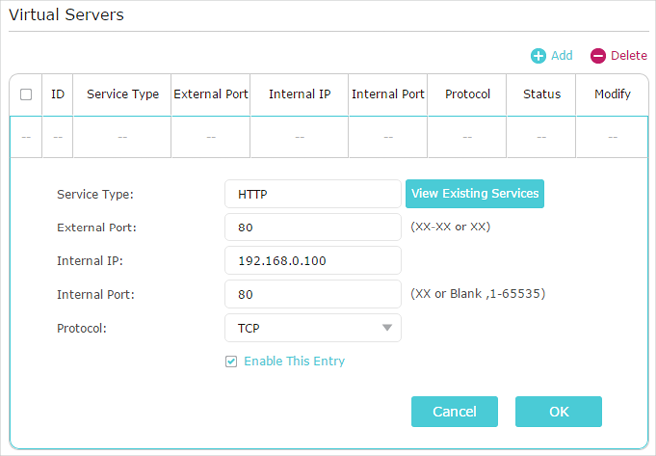
As stated, you'll want your NVR to have a static IP address so it's always the same even after a power outage. You could probably use "NVR" in the service type field if it's not something that's already standard. The external and internal port will be the same and the IP will be the IP of the NVR.
__________________
Steve
'08 Boxster RS60 Spyder #0099/1960
- never named a car before, but this is Charlotte.
'88 targa

SOLD 2004 - gone but not forgotten