Quote:
Originally Posted by flipper35

Hey Dave from SLO, I have a question.
My wife has a Canon T3i and I put it on the tripod with a 300mm lens and the mirror up to take some pictures of the moon a while ago. I put a 2 second delay on since I don't have a remote shutter release and after a few tries with the exposure time and ISO I got some decent pictures except the edges of the moon are all jagged. The rest is sharp. Any thoughts on how to fix that?
|
Shooting a full moon is trickier than a partial moon. For me, the bottom edge tends to be the brightest and blows out. The position and your location affects the moon as well. I find that in the greater L.A. area, shooting the moon when it's up high is best for clarity. Most of the atmospheric crap is gone or at least thin. The best shots are from high altitude (mountains), away from cities.
You really just have to play with the settings, mostly shutter speed. It's digital, so fire away! I do post process as well, so at times, I have shot at a faster shutter speed than one would like to see in camera, but after Photoshop, it's a lot brighter.
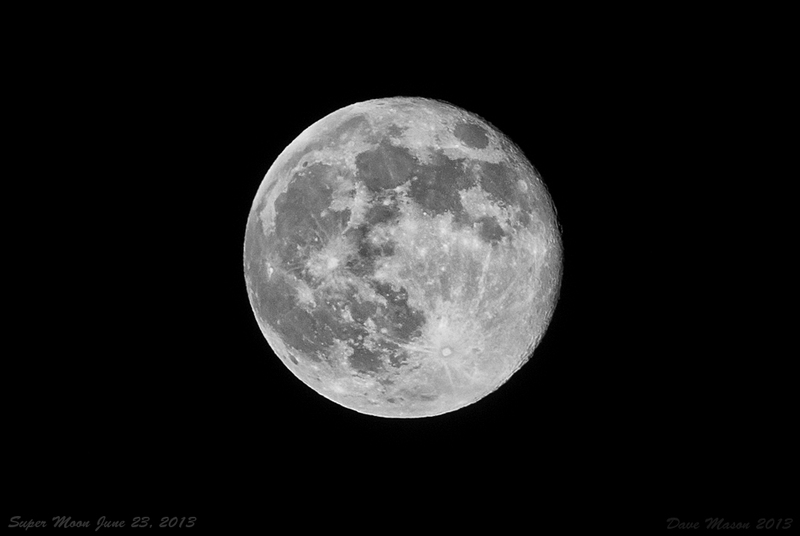
The above was shot at f11, 1/80, ISO 200. Pretty sure I also shot this from a parking lot around the corner from me that was lit brightly well the surrounding area.
Quote:
Originally Posted by GH85Carrera
The moon does not need a long exposure. It is lit by the sun. To expose for the full moon and get surface detail the exposure of 1/200th of a second at F8 with ISO 100. If you want the stars, then you need a long exposure but the moon will be a glowing orb.
|
Bumping the aperture up to f11 or f16 is better. Sweet spot for focus on almost all lenses, in the middle.