Quote:
Originally Posted by Beirut944

i think it must be the heater levers themselves on the dash. They are not connected so i have to assume tha they are in the off position and the tiny army which connect them have been disconnected.
It's a hot country and sometimes people do dumb things like this, especially mechanics.
If anyone has any advice how to peal off that panel and have a look, i would be v grateful
MJ
|
From Clarks Garage --> Garage Shop Manual (top right) --> Temperature Control Removal and Replacement
Introduction
This is a procedure which I've had requests for many times in the past. I've simply put off writing this procedure for some time. If you need to replace your clock, cigarette lighter, temperature control unit, or light bulb for the clock or cigarette lighter, this is the procedure you need to use.
Tools
Stubby Phillips head screwdriver
Regular Phillips head screwdriver (optional - may use stubby Phillips for all)
Small flat tip screwdriver
Small set of needle-nose pliers
Temperature Controls Removal
1. Remove the control knobs (4) for the temperature control unit.
NOTE
Be extremely careful when removing the fan speed control knob. It has a light bulb behind it and it is very easy to break the bulb or the retaining tabs for the stem of the control knob. It may be necessary to slide a small flat tip screwdriver behind the control knob and apply pressure gently while pulling the control knob off the stem.
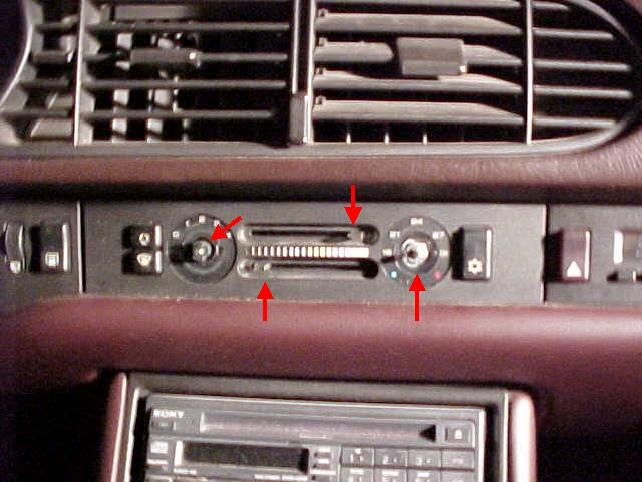
2. Remove the temperature controls cover by carefully sliding a small flat tip screwdriver under each outside edge to loosen the trim piece.

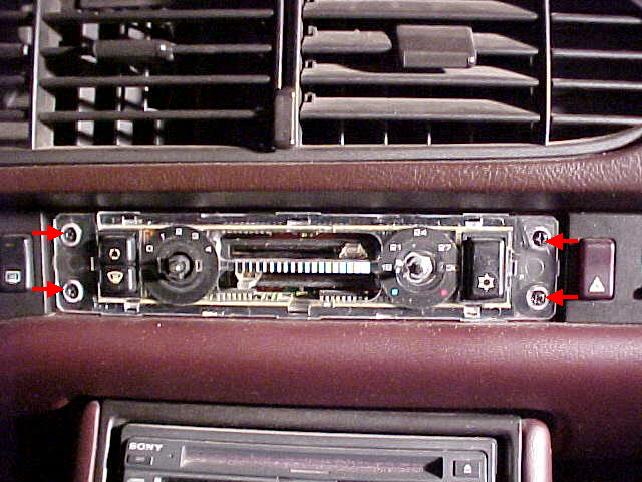
3. Behind the temperature control unit cover you will find four (4) Phillips head screws which hold the unit in place. Remove the screws to slide the control unit out.
Clark's Garage © 1998