

|
|
|
|
| Author |
|
|
Registered

Join Date: Jul 2003
Location: Boeblingen, BRD
Posts: 184
|
Radio upgrade
If anyone can tell me exactly who it was that signed off on the decision to use the Becker CDR-24 on the '06 Boxsters, please let me know so that I can jump on the S-6, get off at Porscheplatz, and punch him in the nose.
Some might call that assault and battery, but no jury of my peers would convict me! All I need to do is make sure the jury is packed with other Boxster owners. I'm not an audiophile, and having grown up in an era where AM radios were common, and an 8 track player was a Hi-Fi expensive option, I don't expect great sound. What I do expect, however, is that when you put a CD in the slot, it begins to play, not give you a cryptic "CD STOP" message that's not documented in the manual. This is especially frustrating when the disk was playing normally, but you had the audacity to skip to the next track, whereupon the system just shuts down. The final insult was when the radio is turned on, it is obviously on as you can change stations, play a CD, hit the CD Changer, or whatever, but absolutely NO SOUND comes out. This continues until some random time in the future when you re-start the car, and it works again. Of course, it's intermittent, so difficult to repeat. I'd like to replace the whole system, but MOST does not make that easy. It's also difficult to find a quality installer, which makes me a little leery of the whole business. What I'd like to do is find a used PCM Navigation system, and replace it with that. My understanding is that this is a plug in system (i.e. Porsche put the wires in the harness), but if I can find one (probably NOT easy), would I need to have the dealer link it to the computer? Failing all that, can anyone recommend a double DIN system with GPS and iPod integration? I saw a previous post on installation of a double DIN Pioneer, but did not see GPS. Similarly, most info I've seen on radio replacement (including Wayne's excellent documentation on this site) seem fairly specific for 986s that use real wire and not fiber optic. Thoughts on using/replacing that system? Becker has told me the radio "slides out" once the surround is removed, but I cannot figure out how to remove the surround without destroying anything. I haven't kept up with many changes in the radio world, my interests lie elsewhere. But I see that Garmin makes an "under-seat" GPS receiver, and the previously mentioned Pioneer has a DVD screen (which I understand needs to have the parking brake lock disabled)... are the two compatible? is this in the realm of the possible? If nothing else, can someone recommend a "newb friendly" audio forum to check out? Thanks for all... |
||
 03-13-2011, 01:25 AM
|
|
|
2011 2LT Camaro Vert

Join Date: Feb 2011
Location: Middle Tennessee
Posts: 101
|
I feel your pain. I too became angry over the craptastic head unit in my '06. I put in the Pioneer AVH-P2300 that is sat-nav ready, but as I don't need sat nav, I am not going to pay the extra $400 that Pioneer wants to add it on. That being said, I've had the new unit in for a week and I love it.
It wasn't that difficult. I don't have the Bose system, but I do have the upgraded Sound Plus including the ASK amp. The kit that you order from Loi at Eurospeed Motor is expensive ($250) but it includes everything you need for the install. I've been playing 16 gigs of music off a micro SD card inserted in a USB reader. It plays flawlessly. If you want NAV, you can spend the $800 and get the Pioneer AVIC unit. The biggest problem that I had was grounding the unit to trick it that the handbrake was on. Couldn't get that to work, so I can't play DVDs while driving (not that I actually wanted to). The install is pretty straight forward and there is a PDF of the CDR-24's pinout in PDF form. If you like I could send it to you. I can't find the link. Also, Loi at Eurospeed Motor will walk you through the install, he was a big help.
__________________
George Former Boxster Owner, Current Camaro Man |
||
|
03-13-2011, 07:33 AM
|
|
|
Registered
Join Date: Jul 2003
Location: Boeblingen, BRD
Posts: 184
|
I guess I'll have to keep looking. I checked the Pioneer you mentioned, and it does not have European tuning, and the navigation is US and Canada only. That will help me out next year, but for right now, here I am near Stuttgart...
|
||
|
03-13-2011, 01:41 PM
|
|
|
Author of "101 Projects"

|
I concur - the Becker radios are very frustrating to use. My particular beef is with the "next CD" or "next radio station" knob. For some reason, mine likes to skip multiple tracks at a time, or multiple stations. If you're driving that makes it difficult to. The Germans who thought this one up should be sent back to the Bratwurst factory.
-Wayne
__________________
Wayne R. Dempsey, Founder, Pelican Parts Inc., and Author of: 101 Projects for Your BMW 3-Series • 101 Projects for Your Porsche 911 • How to Rebuild & Modify Porsche 911 Engines • 101 Projects for Your Porsche Boxster & Cayman • 101 Projects for Your Porsche 996 / 997 • SPEED READ: Porsche 911 Check out our new site: Dempsey Motorsports |
||
|
03-13-2011, 03:19 PM
|
|
|
Registered
Join Date: Jul 2009
Posts: 285
|
check out avic411.com and you'll be on the right track.
I don't think the MOST is as complicated as some make it out to be
__________________
1982 911 SC 3.0L |
||
|
03-14-2011, 12:47 PM
|
|
|
@aircooledph on Instagram

Join Date: Dec 2007
Posts: 334
|
I, too, have the same issue. Is there an upgraded/newer Porsche OEM radio we can replace it with? Maybe with an ipod dock/ socket?
Thanks. Jay |
||
|
03-19-2011, 11:03 AM
|
|

|
|
Author of "101 Projects"
|
Quote:
-Wayne
__________________
Wayne R. Dempsey, Founder, Pelican Parts Inc., and Author of: 101 Projects for Your BMW 3-Series • 101 Projects for Your Porsche 911 • How to Rebuild & Modify Porsche 911 Engines • 101 Projects for Your Porsche Boxster & Cayman • 101 Projects for Your Porsche 996 / 997 • SPEED READ: Porsche 911 Check out our new site: Dempsey Motorsports |
||
|
03-19-2011, 09:36 PM
|
|
|
@aircooledph on Instagram
Join Date: Dec 2007
Posts: 334
|
Thanks Wayne. Do they fit perfectly with no modifications? Do you have these brands in your store?
Jay |
||
|
03-20-2011, 07:45 AM
|
|
|
Author of "101 Projects"
|
Quote:
-Wayne
__________________
Wayne R. Dempsey, Founder, Pelican Parts Inc., and Author of: 101 Projects for Your BMW 3-Series • 101 Projects for Your Porsche 911 • How to Rebuild & Modify Porsche 911 Engines • 101 Projects for Your Porsche Boxster & Cayman • 101 Projects for Your Porsche 996 / 997 • SPEED READ: Porsche 911 Check out our new site: Dempsey Motorsports |
||
|
03-20-2011, 10:07 PM
|
|
|
2011 2LT Camaro Vert
Join Date: Feb 2011
Location: Middle Tennessee
Posts: 101
|
I agree with Wayne--check out Amazon, that's where I got my new Pioneer. AVH-P2300 for $269 with no tax and free shipping. If you're looking to put in a single din unit, I saw a sweet Pioneer on Crutchfield for $89.99 with free shipping and no tax.
__________________
George Former Boxster Owner, Current Camaro Man |
||
|
03-21-2011, 07:08 AM
|
|
|
@aircooledph on Instagram
Join Date: Dec 2007
Posts: 334
|
Thanks George. Any chance you could upload a photo with your new stereo unit?
Regards, Jay P.S. BTW Don I apologize for intruding.. |
||
|
03-21-2011, 07:40 AM
|
|
|
2011 2LT Camaro Vert
Join Date: Feb 2011
Location: Middle Tennessee
Posts: 101
|
Quote:
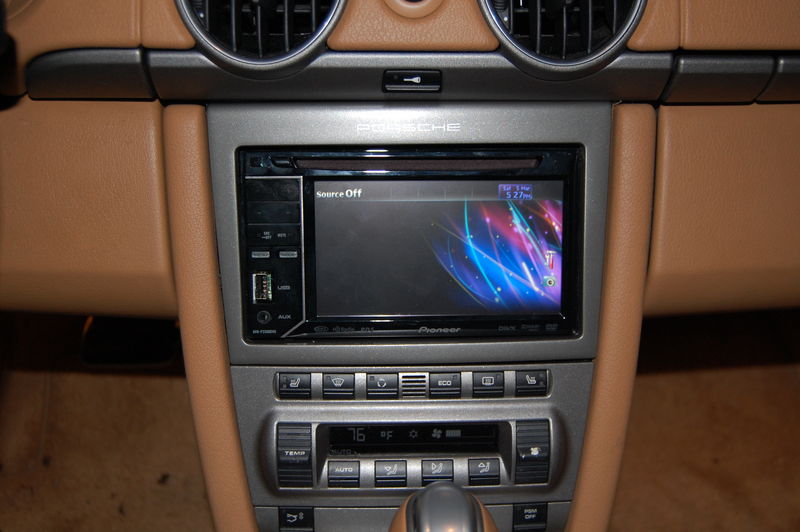
__________________
George Former Boxster Owner, Current Camaro Man |
||
|
03-25-2011, 01:14 PM
|
|

|
|
Registered
Join Date: Nov 2008
Location: Sanford NC
Posts: 1,460
|
The Original Poster might want to ask what others have done on Boxa.net, a UK Boxster forum. Might ask for a lead on a good installer near him. Or ask the OPC (dealer) who they recommend.
|
||
|
03-25-2011, 03:52 PM
|
|
|
@aircooledph on Instagram
Join Date: Dec 2007
Posts: 334
|
George looks excellent! Will probably do the same.. Thanks.
|
||
|
03-25-2011, 05:29 PM
|
|
|
Author of "101 Projects"
|
For future reference, I have placed the PDF file for the CDR-24 radio at the following link: http://www.pelicanparts.com/techarticles/Boxster_Tech/88-ELEC-Radio_Install/CDR_24_Pinout.pdf
-Wayne
__________________
Wayne R. Dempsey, Founder, Pelican Parts Inc., and Author of: 101 Projects for Your BMW 3-Series • 101 Projects for Your Porsche 911 • How to Rebuild & Modify Porsche 911 Engines • 101 Projects for Your Porsche Boxster & Cayman • 101 Projects for Your Porsche 996 / 997 • SPEED READ: Porsche 911 Check out our new site: Dempsey Motorsports |
||
|
03-29-2011, 10:35 PM
|
|
|
Registered User
Join Date: Mar 2011
Posts: 1
|
Slight Adjustment
Hi George,
I came across your picture while doing a search on Google. I wanted to take the time to help you improve the look of the install even further. From the angle the picture was taken, it appears the bezel is not flush with the to top edge of the climate control on the right hand side. What this appears to be is the the mounting clips are not completely in position. The aluminum tabs on the back of the bezel is notched out to lock the mounting clips in place. You simply need to take a very small flat screw driver (we recommend taping it up to avoid marring the paint surface) and press from the top of the bezel so that the mounting clips will properly lock in place. Doing so, will allow the bezel to sit flat with the climate control unit below. Apart from that, congrats on your clean install. The picture attached will help you better understand how the parts come together. Cheers, Loi 
|
||
|
03-31-2011, 12:10 PM
|
|
|
2011 2LT Camaro Vert
Join Date: Feb 2011
Location: Middle Tennessee
Posts: 101
|
Thanks Loi--appreciate it. After looking at the picture when I posted it, I noticed it as well. I simply didn't have it placed properly and subsequently fixed it with a small push.
I looks great and I appreciate all your help on the install!
__________________
George Former Boxster Owner, Current Camaro Man |
||
|
03-31-2011, 01:58 PM
|
|
|
Registered

Join Date: Apr 2006
Posts: 5,179
|
I think the becker radios are, stylistically, very nice looking radios. Whenever someone puts an Alpine or Denon deck in one of these cars it looks absolutely horrible, with silver and chrome and logos and colored lights and whatnot. The orange LCD'd becker radios just look the part, and don't sound too bad either.
But yes, the interface sucks- mine skips multiple stations or cd tracks at a time as well.
__________________
M |
||
|
04-01-2011, 09:40 PM
|
|
|
Author of "101 Projects"
|
Quote:
-Wayne
__________________
Wayne R. Dempsey, Founder, Pelican Parts Inc., and Author of: 101 Projects for Your BMW 3-Series • 101 Projects for Your Porsche 911 • How to Rebuild & Modify Porsche 911 Engines • 101 Projects for Your Porsche Boxster & Cayman • 101 Projects for Your Porsche 996 / 997 • SPEED READ: Porsche 911 Check out our new site: Dempsey Motorsports |
||
|
04-01-2011, 10:08 PM
|
|
|
Registered
Join Date: Apr 2009
Location: New Jersey
Posts: 7
|
When replacing the radio, do you bypass the factory amp & MOST bus, using the head unit for power? I always thought it was more complicated than just replacing the head unit.
Thanks, Steve |
||
|
04-14-2011, 10:43 AM
|
|


 Porsche 959
 1973 911 RSR Clone
 1972 Porsche 911 RS Clone
 2000 Porsche Boxster 3.4
 2003 MINI Cooper S
 1987 Porsche 962C
 1988 Porsche 962C
 1980 Porsche 935
 1986 Porsche 962
 1987 Porsche 962GTi-106b
 2000 Lola B2k/10
 Jamaican Rally Car
 Porsche 962C
 1960 BMW 700 HotRod
 1991 Porsche 962 Can Am (Interserie)
 1958 Porsche 356 Speedster
 1957 Mercedes 190 SLR Project
 Daimler Ferret
 American La France Lil Mo Fire Engine
 Pantera Group 4
 Alfa Romeo 1900C Touring Superleggera
 Alpine A110
 Perana Z-One Zagato
 Dauer 962 LeMans
 Porsche 962-108B
 Adams Probe 16
 Zagato Testadoro 750

