Pelican Parts
Parts Catalog Accessories Catalog How To Articles Tech Forums
Call Pelican Parts at 888-280-7799
Shopping Cart Cart | Project List | Order Status | Help


Go Back   Pelican Parts Forums > Porsche Forums > Porsche 996/997/991 Forum


Reply
 
LinkBack Thread Tools
Author
Thread Post New Thread    Reply
Registered
 
Fleming's Avatar
 
Join Date: Oct 2002
Location: Minneapolis
Posts: 775
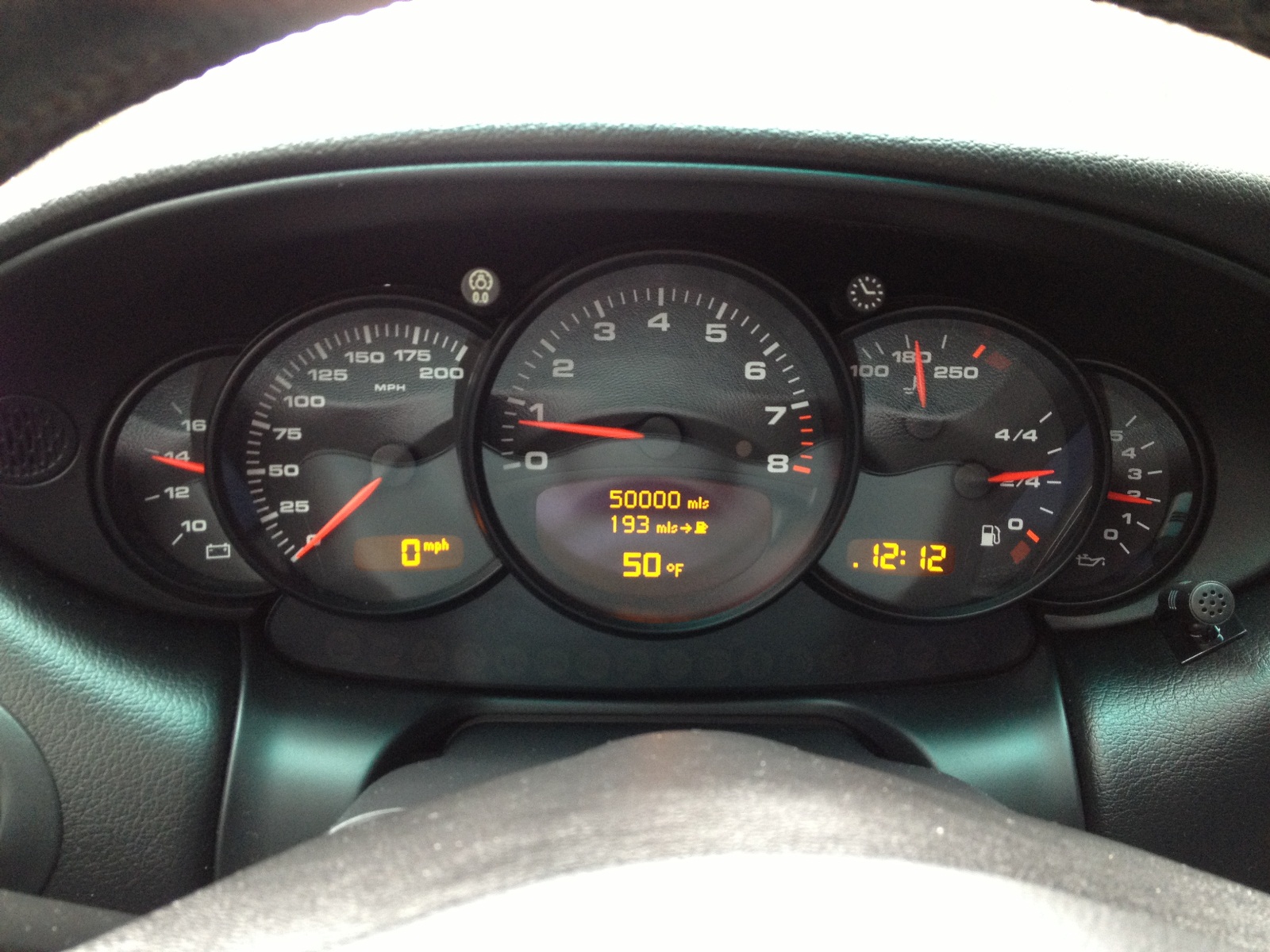
Dash light brightness level 1999

Does anyone have a 1999 Drivers Manual giving the method and which knob or lever to adjust the dash brightness.

It appears that a "medium bright" has turned into a very "low light" level.
In bright sunshine neither is adequate.

The car was used by another and when it came back it was on low, how do I get it to the previous some-what brighter or better still - full bright - instrument lights?

Thanks.

Old 07-21-2016, 06:05 PM
  Pelican Parts Catalog | Tech Articles | Promos & Specials    Reply With Quote #1 (permalink)
Registered
 
Fleming's Avatar
 
Join Date: Oct 2002
Location: Minneapolis
Posts: 775
Someone must have the 1999 drivers manual with instructions on how to change the intensity of the dash lights?

Please.

I've seen them in two brightness' but don't know how they were changed. (I need that secret hand shake...)
Old 07-29-2016, 08:44 AM
  Pelican Parts Catalog | Tech Articles | Promos & Specials    Reply With Quote #2 (permalink)
Registered
 
JFP in PA's Avatar
 
Join Date: Aug 2010
Location: Earth.............
Posts: 2,895
Quote:
Originally Posted by Fleming View Post
Does anyone have a 1999 Drivers Manual giving the method and which knob or lever to adjust the dash brightness.

It appears that a "medium bright" has turned into a very "low light" level.
In bright sunshine neither is adequate.

The car was used by another and when it came back it was on low, how do I get it to the previous some-what brighter or better still - full bright - instrument lights?

Thanks.


Above the tach and to the left is a small knob with a light bulb in it, it is the rheostat that controls the dash light levels.
__________________
Accrochez-vous bien de vos rêves..........."
Old 07-29-2016, 09:59 AM
  Pelican Parts Catalog | Tech Articles | Promos & Specials    Reply With Quote #3 (permalink)
Registered
 
Fleming's Avatar
 
Join Date: Oct 2002
Location: Minneapolis
Posts: 775
DOH.....

twist to change dash light level

and all this time I would press that same button to reset the odo.....

Boy it sure would be a good thing to find a 1999 Drivers Manual. Anyone have one?


Thank you JFP.

Drive 'um if ya got 'um.
Bob
Old 08-02-2016, 08:00 AM
  Pelican Parts Catalog | Tech Articles | Promos & Specials    Reply With Quote #4 (permalink)
Registered
 
Join Date: Jan 2004
Location: Pittsford, NY
Posts: 3,704
Quote:
Originally Posted by Fleming View Post
DOH.....

twist to change dash light level

and all this time I would press that same button to reset the odo.....

Boy it sure would be a good thing to find a 1999 Drivers Manual. Anyone have one?


Thank you JFP.

Drive 'um if ya got 'um.
Bob
Porsche 911 Owners Manual Carrera 2 4 Handbook Guide Maintenance 1998 2000 1999 | eBay
__________________
Tony G
2000 Boxster S
Old 08-03-2016, 10:30 AM
  Pelican Parts Catalog | Tech Articles | Promos & Specials    Reply With Quote #5 (permalink)
Registered
 
Robbbyg's Avatar
 
Join Date: Aug 2008
Posts: 1,138
Garage
Dont mean to hijack JFP how do you get those Yellow lights on the bottom of readouts so bright? mine are LCD and very hard to read
Old 08-29-2016, 06:58 PM
  Pelican Parts Catalog | Tech Articles | Promos & Specials    Reply With Quote #6 (permalink)
 
Registered
 
JFP in PA's Avatar
 
Join Date: Aug 2010
Location: Earth.............
Posts: 2,895
Quote:
Originally Posted by Robbbyg View Post
Dont mean to hijack JFP how do you get those Yellow lights on the bottom of readouts so bright? mine are LCD and very hard to read
Didn't do anything, factory dash at full brightness. Yours may just be aging.

__________________
Accrochez-vous bien de vos rêves..........."
Old 08-30-2016, 02:34 AM
  Pelican Parts Catalog | Tech Articles | Promos & Specials    Reply With Quote #7 (permalink)
Reply


All times are GMT -8. The time now is 11:19 AM.


Powered by vBulletin® Version 3.8.7
Copyright ©2000 - 2026, vBulletin Solutions, Inc.
Search Engine Optimization by vBSEO 3.6.0
Copyright 2025 Pelican Parts, LLC - Posts may be archived for display on the Pelican Parts Website -    DMCA Registered Agent Contact Page
 

DTO Garage Plus vBulletin Plugins by Drive Thru Online, Inc.